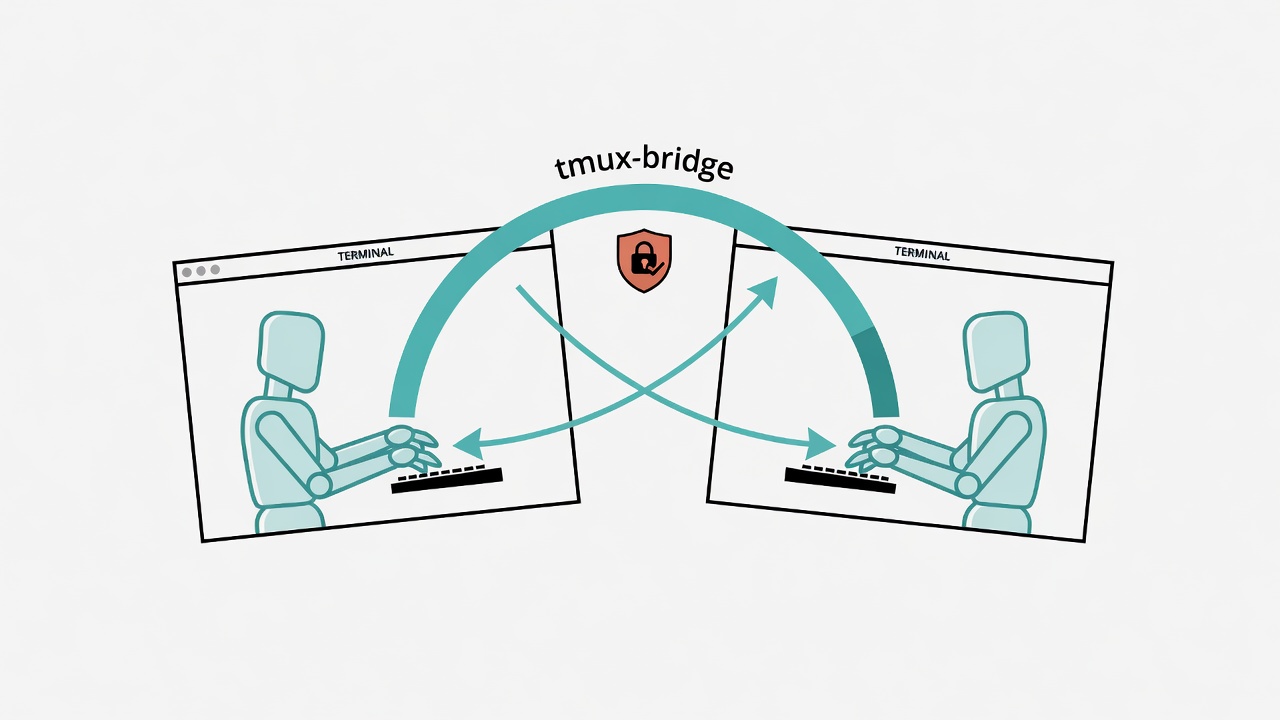
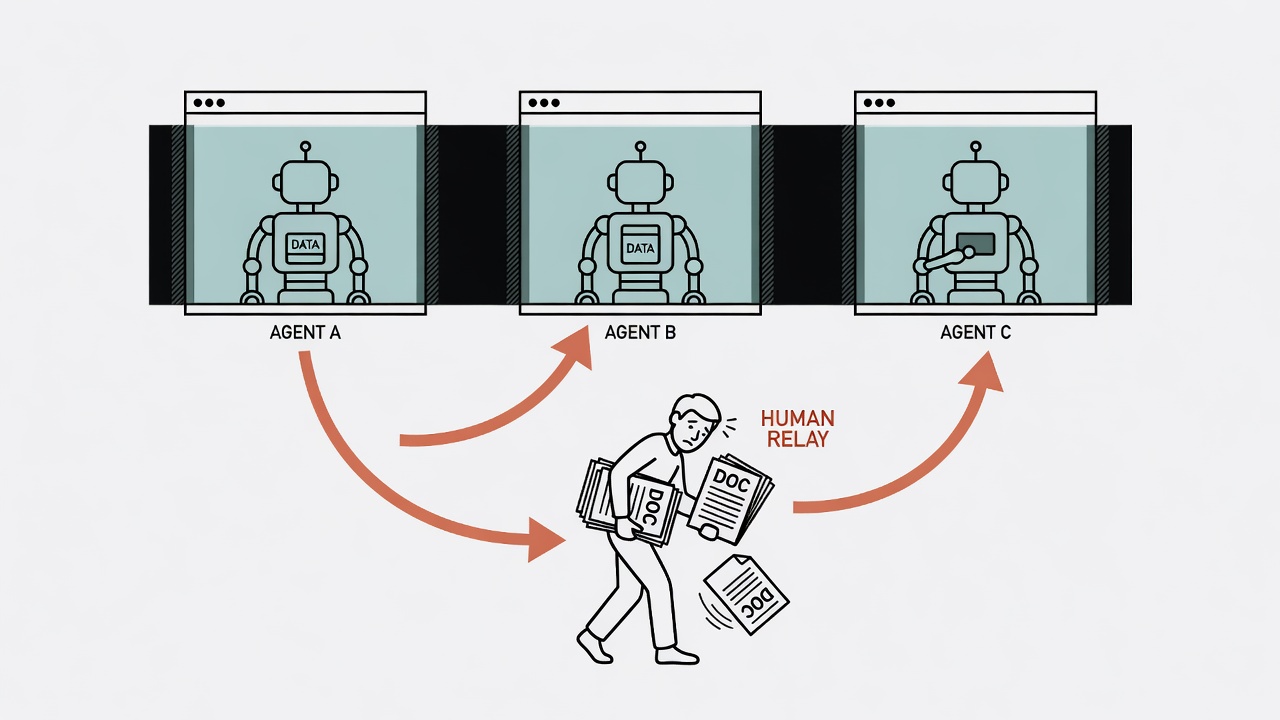
I have been running three AI coding agents at once lately: Claude Code on the main line of work, Codex for rescue-style debugging, and a self-built Hermes gateway in the background. All three live in their own terminal windows, so none of them can see what the others are doing. When one agent needs another agent's output, or I want Codex to check whether what Claude Code just changed actually works, the only path is me in the middle, copy-pasting.
With two agents that is still manageable. Past three, the human message bus starts to fall apart: window switching until your eyes blur, pasting into the wrong place, missing that some agent has been waiting for your reply for a long time.
This post records how I used tmux-bridge-mcp to fix that. It covers the security review I ran before wiring it into Claude Code and Codex (that step actually took more time than the install itself), then the side job of pointing Codex at a local oMLX model after the install, then end-to-end validation across three different agents (which also turned up something worth treating as a warning), and finally notes on multi-pane / multi-window terminal tuning, which almost anyone who runs several agents at once will hit.
Test environment: every version number, timing, and terminal snippet below was recorded on 2026-07-07 as I ran it that day. The environment then was grok CLI
0.2.87-mac, Codex CLI0.142.5(cloud account defaultgpt-5.5). These tools move fast; the numbers you get now will probably not match mine. I keep the original figures instead of rewriting them to the latest release, because the value of this post is "what I actually stepped on at the time," not how pretty the version numbers look.
The problem: agents locked in their own terminals
MCP (Model Context Protocol) already solves "how an agent calls external tools." Claude Code, Codex, Gemini CLI, and Kimi CLI all support it natively. MCP does not ship a built-in "let agent A read and write the terminal where agent B lives" capability, because the two agents are usually fully independent processes whose sessions never meet.
If both agents run in different tmux panes, you can in principle use tmux's own commands (send-keys, capture-pane) to operate across panes. What is missing is only a layer that wraps those commands into standard tools an agent can call. That is exactly what tmux-bridge-mcp does.
What tmux-bridge-mcp is
tmux-bridge-mcp (github.com/howardpen9/tmux-bridge-mcp, same name on npm, MIT license, author howardpen9, 31 stars, created March 2026) is a standalone MCP server. It exposes 9 tools:
tmux_list: list current tmux sessions / windows / panestmux_read: read what a pane currently showstmux_type: type text into a pane (without submitting)tmux_message: liketmux_type, but automatically prepends sender infotmux_keys: send key presses (for example Enter, Ctrl-C)tmux_name: name a pane so you can target it by name instead of coordinatestmux_resolve: resolve a name back to real pane coordinatestmux_id: look up the pane id of the caller itselftmux_doctor: check whether the tmux environment is healthy
The mechanics are straightforward: the side that calls these tools (for example Claude Code) must support MCP client, but the target pane being read or written needs no MCP knowledge at all. It only needs to be a live terminal process. The actual keyboard injection is tmux send-keys run by the tmux-bridge server against that pane, which is not fundamentally different from you typing into that window by hand.
In other words, once Claude Code has tmux-bridge-mcp installed, it can read and write the Codex process in the neighboring pane even if Codex has no MCP server installed at all. That is the first key to the risk model: the capability is asymmetric. The side that installed the bridge gets control over the other pane; it is not negotiated two-way communication.
Core mental model: read-act-read
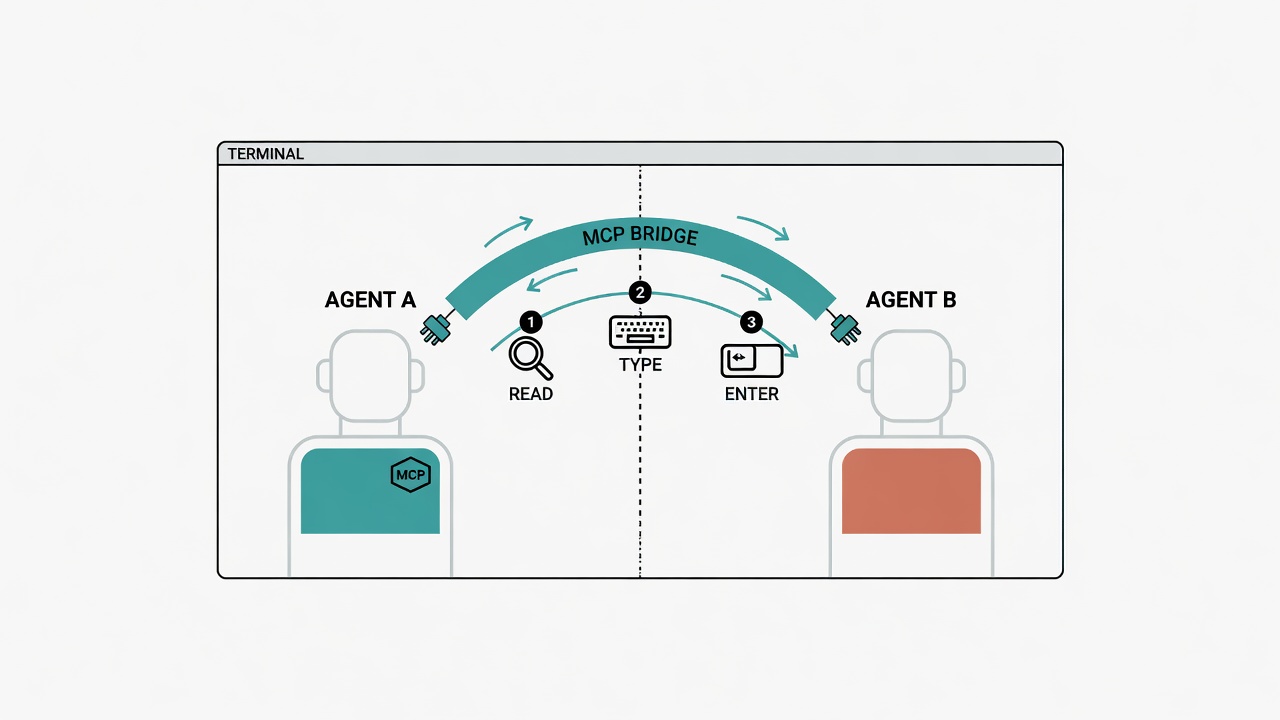
The standard usage flow looks like this:
tmux_read(target): first read what the target pane currently showstmux_message(target, text): type the message in (still no Enter)tmux_read(target): read again and confirm the text really landed correctlytmux_keys(target, keys=["Enter"]): press Enter to submit- Do not actively poll the other side for a reply; wait for them to type the reply into the sender's pane themselves
Step 1 is not an optional habit. It is a built-in "read guard" in the tool: tmux_type / tmux_message / tmux_keys all check whether the caller has already read that pane. If not, they error out and refuse to run. The design intent is to force you to see the target pane's current state before acting, so you cannot type blind.
But there is a detail that matters a lot, and it is the one I spent the most review time confirming: this read guard is only an operational ordering reminder, not a security boundary. The author says the same thing in the docs. As long as the caller reads the target pane once first (even if the content has nothing to do with what they are about to type), the guard lets them through. It cannot stop "should this text be sent at all"; it only confirms "did you glance at it."
That limitation decides which scenarios you can use this tool in safely. The next section goes into that.
Why a security review first
Workspace policy requires a security review before installing new tools or new MCP servers. You do not get to skim the source once and declare it fine. This tool involves "let one agent inject content that is equivalent to human keyboard input into another agent's terminal," so the risk model is more complex than a typical read-only MCP tool. I delegated a formal review to a dedicated agency-security-engineer agent instead of glancing at it myself.
How the review was done:
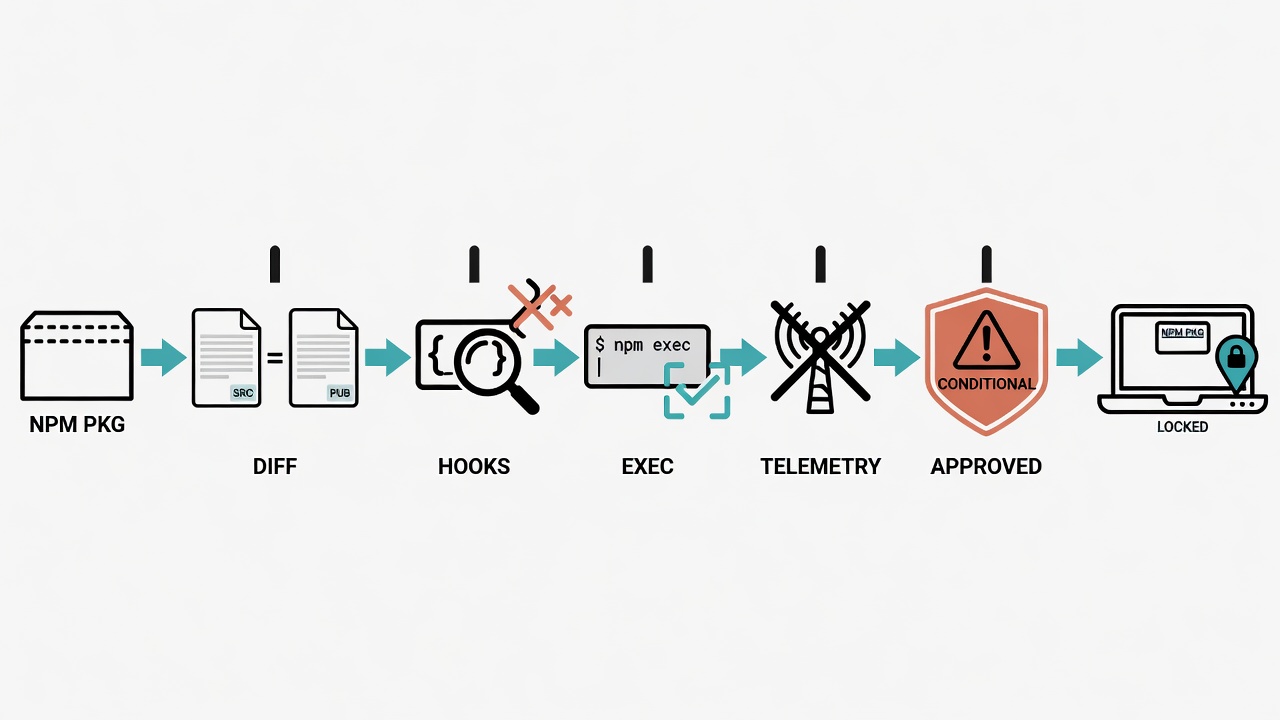
- Clone the GitHub source to the local machine
- Use
npm packto unpack the version actually published on the npm registry, then compare file by file against the GitHub source for consistency (this step defends against supply-chain attacks of the form "source looks clean, published package was tampered with"; clean GitHub does not mean what you install withnpxis the same clean tree) - Scan
package.jsonforpostinstall/preinstallhooks - Confirm file by file that every place that runs an external command uses a form like
execFile(bin, [array args]), not string-concatenated arguments handed to a shell (the former blocks shell injection; the latter is easy to inject if any user input is not escaped cleanly) - Scan for hidden network calls or telemetry
The conclusion was conditional approval. The code itself is clean: dependencies are only the well-known packages @modelcontextprotocol/sdk and zod, no postinstall, no obfuscated code, no telemetry, every exec call uses array arguments, and the npm publish matches the source file by file.
The "conditional" part comes from structural risk in the tool's design itself, independent of code quality: it lets any agent inject keyboard-equivalent input into another agent's pane, including pressing Enter to submit. And the read guard above is only an ordering reminder, not a security boundary; the caller only needs one prior read to bypass it.
A concrete risk scenario looks like this: an agent reads text from an untrusted source (a web page, an email, a third-party API response), and that text embeds inductive instructions. The agent is steered into forwarding that text unchanged into another pane, which is equivalent to bypassing the target pane's own tool-approval flow. In other words, this is a prompt-injection-chain attack surface: the injection does not need to land directly in the victim agent; borrowing another agent's hands is enough.
Four mitigations attached to approval
Given that risk model, the review approval came with four mitigations. I adopted all of them:
First, pin the version hard. Both config files fix tmux-bridge-mcp@0.3.0 and forbid npx -y tmux-bridge-mcp without a version (which auto-grabs latest). Any later upgrade requires manually reading the source diff between old and new, confirming no new risky behavior, then bumping the version by hand.
Second, a dedicated tmux socket. Set TMUX_BRIDGE_SOCKET to a dedicated socket path (for example /tmp/tmux-agents-<user>.sock) so this tool never touches the machine default or global tmux server. If something goes wrong, blast radius is limited to panes in that dedicated session, not the other tmux sessions I use by hand for daily work.
Third, stay out of sensitive collaboration contexts. Do not use this when handling third-party or customer-sensitive data, for example company group collaboration with external members present.
Fourth, untrusted content must not be relayed without human review. Text from untrusted external sources (web scrape results, email bodies, third-party API responses) must not go straight into tmux_message / tmux_type for relay into another pane without a human reading it first. tmux_keys also must not press Enter on the user's behalf for irreversible actions such as deletes, force push, or key material operations. Those confirmations always return to the operator's own approval path; keyboard injection must not stand in for them.
Of the four, the fourth is the easiest to overlook and the most important. The first three shrink the attack surface; the fourth names which actions this tool must never be allowed to perform on your behalf.
Install steps
If tmux is not installed yet:
brew install tmux
Then attach a version-pinned MCP server on both sides, sharing the same dedicated socket.
On the Claude Code side, add a server entry in the project .mcp.json. The important bits are that args must include the version, and TMUX_BRIDGE_SOCKET points at the dedicated socket:
{
  "mcpServers": {
    "tmux-bridge": {
      "command": "npx",
      "args": ["-y", "tmux-bridge-mcp@0.3.0"],
      "env": {
        "TMUX_BRIDGE_SOCKET": "/tmp/tmux-agents-<user>.sock"
      }
    }
  }
}
On the Codex side, you can use the built-in command to write config automatically:
codex mcp add tmux-bridge -- npx -y tmux-bridge-mcp
That writes an entry into ~/.codex/config.toml, but the command itself does not accept a version pin. After it runs, manually add the version pin and the same TMUX_BRIDGE_SOCKET so both sides point at one socket.
When creating the dedicated session, start an agents session on that socket, split left/right, then attach @name on each pane (you can also use MCP tmux_name; native commands are usually more intuitive for the first build):
tmux -S /tmp/tmux-agents-<user>.sock new-session -d -s agents -n main
tmux -S /tmp/tmux-agents-<user>.sock split-window -h -t agents:main
tmux -S /tmp/tmux-agents-<user>.sock set-option -p -t agents:main.0 @name claude
# Same idea for the remaining panes: @name codex, etc.
Claude Code must be fully restarted to pick up a new .mcp.json. Rerun claude from the project root; a simple reload is not enough.
Side job: pointing Codex at a local model
While installing tmux-bridge, I also wanted Codex to switch to a local oMLX model server with codex --profile omlx, listening on 127.0.0.1:8090, model unsloth's Qwen3.6-35B-A3B 4bit quant. That has no direct link to tmux-bridge, but I sorted it in the same environment cleanup pass and recorded the traps I hit.
I first tried the old style: a [profiles.omlx] block in config.toml. Codex CLI 0.142.5 errored immediately, saying a legacy profile table cannot coexist and that the profile must move into a standalone file. The new approach is one file per profile, named ~/.codex/<profile-name>.config.toml.
After some thrashing I found that the standalone file (omlx.config.toml) already existed and was fully correct. An earlier truncated ls output had simply hidden it. Core fields look roughly like this:
model_provider = "omlx"
model = "unsloth--Qwen3.6-35B-A3B-UD-MLX-4bit"
model_reasoning_effort = "high"
I tested the link with codex exec --profile omlx --skip-git-repo-check "reply with exactly the word: pong". The local model correctly replied pong. The lesson is unrelated to the tool itself: confirm the file is truly missing before you start rewriting config, or you will walk a full circle for nothing.
End-to-end validation: whether the pipe works, and one surprise
I could not truly open two live Claude Code / Codex sessions at once, operate them, and show you the full MCP chain, so I used an equivalent approach: verify the pipe itself (tmux read/write layer + target agent layer) end to end.
Round one tested codex against local oMLX: run codex --profile omlx in the codex pane, then use the same low-level sequence the MCP tools use: tmux send-keys -l to type without Enter, capture-pane to confirm text landed, then send-keys Enter. The test message was reply with exactly the word pong. The local 35B-A3B correctly replied pong. In interactive mode this run took over a minute, much slower than the second-scale reply from non-interactive codex exec. If you also bridge local models through tmux-bridge, expect that latency gap; do not assume a hang means the pipe is broken.
I then pushed validation further: send one real message into each of three local / localized agents on different panes, and check whether "type → submit → read reply" has per-CLI traps.
Before acting I ran claude mcp list to see whether this session had actually attached tmux-bridge-mcp. The process was running in the background (npm exec tmux-bridge-mcp@0.3.0), but it did not appear in this session's MCP connection list. A living process is not the same as being attached and callable as a tool. Validating MCP integration cannot stop at "is the related process running"; you must use the client's own list command to confirm connection state.
Because it was not truly attached this time, I continued with the raw method that matches the same bottom logic: type with tmux send-keys, read back with tmux capture-pane. That validates the same read-act-read pipe, only past the MCP wrapper. The conclusion "the pipe works" stands; the answer to "is the MCP wrapper attached" is an honest no.
I tested three panes in order:
(a) codex (--profile omlx, local oMLX). After sending a Chinese test message, the first tmux send-keys ... C-m did not truly submit. The text entered the input box and sat there. codex's TUI treated the whole Chinese paste as a bracketed paste (the terminal protocol wraps "this is one paste, not keystroke-by-keystroke typing" in special escapes), so you need one extra Enter to commit: the first Enter was not "ignored," it was consumed to end paste mode. After the second Enter, codex correctly replied that it received the message.
(b) agy (Antigravity CLI, model Gemini 3.5 Flash). Same first snag: text in the box, not submitted; an extra Enter triggered it. The reply was a personal quota exhausted notice, reset in about 25.5 hours. That actually proves the bridge itself is fine: the message arrived and agy ran far enough to handle the request. The failure point is account quota, not the tmux bridge layer. I then pressed 0 to skip the feedback prompt so the pane returned to standby.
(c) grok (grok-0.2.87-mac CLI, Composer 2.5). No extra Enter needed this time; one submit entered processing ("Waiting… 4.9s"), Turn completed at 9.4s, reply confirmed receipt. Side note: that grok pane was only 39 characters wide, so capture-pane returned a truncated view of the reply. Using cat -A on the raw output (including escape sequences) restored the full content. When a narrow pane truncates display, you do not have to resize; the raw capture-pane output still holds the full character stream, only the on-screen wrap/cut is lossy.
Summary of the three tests:
| Pane | Tool | Result |
|---|---|---|
| codex (oMLX local model) | Needs one extra Enter to submit (bracketed paste), then normal reply | |
| agy (Antigravity / Gemini 3.5 Flash) | Needs one extra Enter; quota exhausted (not a bridge issue) | |
| grok (grok-0.2.87-mac) | Single submit processes and replies normally |
This validation showed that tmux-layer read/write timing, read-guard behavior logic, and three totally different target panes (local-model Codex, cloud Gemini via Antigravity, grok CLI) can be strung together. What the MCP tools do is package that whole sequence as a standard agent-callable interface; there is no magic underneath. And precisely because I checked the connection list on the side, I found the MCP server was not truly attached, which is a useful reminder: "tool installed, process running" is still one verification step short of "actually usable."
Appendix: environment tuning that makes multi-pane / multi-window workable
After installing tmux-bridge and testing three agents, I spent more time making the multi-agent terminal environment itself comfortable. These notes are not directly about tmux-bridge-mcp, but anyone who opens several agents, panes, or windows at once will almost certainly hit the same set of problems.
Shift+Enter cannot insert a newline inside tmux
My terminal is Ghostty, with tmux 3.7b. Inside tmux with Claude Code, Shift+Enter would not insert a newline; it only submitted.
Diagnosis pointed at tmux's extended-keys. Default is on, meaning tmux decides, based on terminfo (the terminal capability database), whether to forward extended key reports from the terminal (modifier combos such as Shift+Enter that ordinary escapes cannot express and need CSI-u style extended protocols) into the inner program. Newer terminals like Ghostty are often not correctly detected by tmux as having that capability, so tmux simply does not forward them, and the Shift+Enter signal is swallowed.
The fix is to force forwarding at the top of ~/.tmux.conf, and explicitly declare extkeys for the terminal name instead of relying only on a lucky xterm* wildcard:
set -s extended-keys always
set -as terminal-features 'xterm*:extkeys'
set -as terminal-features 'ghostty*:extkeys'
Key detail: a plain tmux source-file reload is not guaranteed to take effect, because extended-keys negotiation is tied to client connection state. Detach then reattach (or fully quit and reopen the terminal) is the safest path. After detach/reconnect, Shift+Enter confirmed newline worked.
But later this feature silently broke once more, and detach/reattach did nothing. The real culprit was not renegotiation failing; it was two bindings in ~/.tmux.conf that look reasonable but actively cancel each other:
bind-key -T root C-Enter send-keys Enter
bind-key -T root S-Enter send-keys Enter
The intent was "map Ctrl+Enter / Shift+Enter to newline," but send-keys Enter only sends a plain Enter. At the tmux layer that strips the modifier information and turns it into the same signal as bare Enter for Claude Code inside, so it always submits and never newlines. tmux list-keys -T root | grep -i enter is the most accurate check; as long as those two lines remain, no amount of detach/reattach or Ghostty restart helps, because tmux is actively intercepting rather than failing terminal negotiation.
Also, once a bind-key has taken effect, deleting the line from .tmux.conf does not automatically remove it. The live tmux server needs a manual unbind:
tmux list-keys -T root | grep -i enter
tmux unbind-key -T root C-Enter
tmux unbind-key -T root S-Enter
After unbind, no detach is required; it takes effect immediately. In short: debug extended-keys negotiation with detach/reattach, debug binding interception with list-keys / unbind-key. The two failure modes look the same ("Shift+Enter submits instead of newline") but the root causes are completely different. This also loops back as a rule: do not "add insurance" by manually binding S-Enter / C-Enter to send-keys Enter. Bind nothing; let the extended-keys / terminal-features setup above pass the raw sequence through so the app can decide. That is the correct approach.
New windows / splits always land in the workspace directory
When you open a new tmux window or split, the default inherits the current pane's path. If you are deep in a subdirectory and open a new window, the new window often sticks there too. What I want is: no matter where I open it, land on the workspace root (~/workspace).
Newer tmux removed the global default-path. The approach is to override the key bindings that create windows/splits and pass the target path with -c. That only applies to windows created through those bindings; a direct tmux new-window / tmux split-window will not pick it up.
Four panes in one window is too tight; switch to four independent windows
After the three-agent tests above, one window held 4 panes (main / codex / agy / grok all jammed with split-window), and the screen felt shredded. The fix is to use tmux windows instead of panes: show only one at a time, keep the others running in the background, which fits "focus on one, leave the rest on standby." I used tmux break-pane to break codex / agy / grok into their own windows and rename them, left Claude Code on window 1 (main) as the primary view, kept the session alive so switching back shows the latest state. The bottom status bar lists window names; mouse or prefix+number both switch.
Window switching shortcuts without pressing prefix
prefix+number switches windows, but every switch needs prefix first (default Ctrl-b) then a number, which gets annoying when you switch a lot. The approach is root-level bindings in ~/.tmux.conf that need no prefix (M-1 through M-n for Meta/Alt+digit), and on the Ghostty side translate the physical combo you actually want into a sequence tmux recognizes.
My Ghostty already had macos-option-as-alt = left (left Option sends Alt/Meta, right Option keeps special characters). In theory left Option+14 should switch windows, but in practice it did nothing, so I switched to Option+Command+15. The blocker: macOS Cmd (Super) is not a standard modifier in the terminal protocol. Before it reaches Ghostty it is often swallowed by app built-in shortcuts (for example default super+1 through super+9 switch tabs) and never encoded as an escape into shell/tmux. To make Option+Command+digit actually emit something tmux understands, you must define in Ghostty settings what that combo sends. The built-in esc: action (format esc:text) can turn Option+Command+N into "ESC + N", which is exactly tmux's M-N, so the tmux side does not need to change binding semantics. After reload via Ghostty's reload-config shortcut, Option+Command+1~5 switched correctly in testing.
Path pinning, window switching, and Ghostty translation can be collected into one sketch (expand for your workspace path and window count):
# ~/.tmux.conf sketch: fixed path for new windows + prefix-free switching
bind-key c new-window -c "~/workspace"
bind-key '"' split-window -c "~/workspace"
bind-key % split-window -h -c "~/workspace"
bind-key -n M-1 select-window -t 1
bind-key -n M-2 select-window -t 2
# M-3~M-5 same idea; Ghostty side: Cmd does not enter the terminal protocol, send ESC+digit instead
keybind = alt+super+1=esc:1
keybind = alt+super+2=esc:2
# alt+super+3~5 same idea
Adding a 5th window: cloud codex alongside the local one
After four windows ran smoothly, I added a 5th window for "cloud" codex (default model, no --profile omlx), as a separate process from the local oMLX codex on window 2, kept side by side on purpose for comparison. I created it with tmux new-window naming it and setting ~/workspace as cwd, then sent codex to start. On screen it showed Codex v0.142.5, directory ~/workspace, and the model line later displayed gpt-5.5 default.
One detail worth keeping: this cloud account showed under 10% weekly quota left right at startup, the same class of reminder as agy hitting the ceiling earlier. The practical benefit of local and cloud side by side is: when cloud quota bottoms out, the local side can still hold the workflow so the whole chain does not stall together. Add a 5th switching key on both tmux and Ghostty; the pattern is identical to 1~4.
Current full window layout:
| Window | Contents | Switch key |
|---|---|---|
| 1: main | Claude Code | Option+Cmd+1 |
| 2: codex | codex --profile omlx (local oMLX) | Option+Cmd+2 |
| 3: agy | Antigravity CLI | Option+Cmd+3 |
| 4: grok | grok-0.2.87-mac | Option+Cmd+4 |
| 5: codex-cloud | codex (cloud gpt-5.5 default) | Option+Cmd+5 |
Wrap-up
tmux-bridge-mcp solves a practical problem: multiple AI agents locked in their own terminals, with a human copy-paste bus in the middle, collapses once agent count grows. Its approach is also simple: wrap tmux's native read/write capabilities as standard MCP tools.
But a capability that lets one agent directly drive another agent's terminal carries structural risk by nature, and that risk does not vanish just because the code is clean. What actually holds the line is the four mitigations on the usage checklist, especially the last: untrusted content must not be relayed without human review, and confirmations for irreversible actions always stay with the operator. The tool can spare you repetitive copy-paste; it cannot make those judgments for you.
After running end-to-end tests across three different agents, I also learned this: an MCP server process "running" is not the same as "attached." That is the easiest step to skip when checking MCP integration, so it is worth making a habit of confirming with the client's own list command every time. And the terminal tuning that makes a multi-agent environment itself usable (newlines, paths, window layout, shortcuts) is fussy, but it is the last mile that makes this whole multi-agent workflow actually pleasant to run.
Found this useful?
Follow for new AI × biomedical research notes:
Or buy me a coffee to keep new content coming.
☕ Buy Me a Coffee